Thursday, 29 September 2011

Application Development

After a lot of thought I decided to completely redesign my interface, making it more fluent, easier to use and more to the point. At the end of the day my application is still an interface for home owners that are concerned with saving energy easier. One of the new components I added was a map view of a house where the user could press lights on and off on the display, this is a great way of saving energy fast from anywhere in the house at any time. 

I've tried to rely less on graphs and numbers and more on simple but incredibly useful actions such as the lighting function. I believe this is the best way to relate to my target audience.


Application Development

After working through many problems in flash I finally finished a small video clip tutorial of the application in use, I had to make it a video of it in use because my application was targeted at either mobile or mounted touch screens around the house and physical movement of items on the screen can not be illustrated correctly with a triggered movement using a button in flash. My application video reaches its target audience in both its design aesthetic and targeted functionality.

Here is a screen shot of the video:

Application Development

This is my first design for the central rotating display of specific items customized by the user showing graphs in energy usage and management.


 I then changed the design slightly from this; experimenting with colours and style.


However I will still try new variations before deciding on a final display.

Application Development

For my application interface I researched a lot of code for animations especially for constant rotation of an object. I used this code to tie in one of the most important attributes for my application and that is complete engagement in the application, I tried to achieve this by having constant animations even if they are subtle. By doing so I believe it makes for a more interesting application and one that can be understood both through visuals and through the written word within the application.

The central circle is in essence the heart of the application, by having it constantly rotating and editable it draws attention and interest and ties the whole application together.

Application Development

My design has changed since I first conceptualized it, I have refined the movements and animation in the design to accommodate my flash skills as well as choosing a fitting colour scheme for my user group. Because my user group is home owners I estimate the age group to be around 35+ years of age. For this reason I chose soft gradient colours because they relate to the user's maturities and wants and needs when considering software.

Sunday, 11 September 2011

Paper Prototype


Project 2 Interface Final Idea

First-world consumers are some of the worst in the world. There is an obvious resentment to the facts of non-renewable energy. It is up to clever design and technology to enable these consumers to understand visually the impacts of their energy consumption. My target group is home owners, families and flatmates. This group accounts for the majority of electrical consumption be it first hand or second hand influence. My interface is essentially a small maneuverable functional screen that can remotely control electrical devices in the house, with the ability to remotely turn devices or all electricity to the house on and off, set timers for specific devices and situations such as heating, hot water and night time. By using touch screen technology the user can quickly view and change settings easily. The design will be colourful and engaging, the screen will constantly show real-time graphs of energy consumption and where it is being consumed from. This way the user can control the devices that use the most energy. Through the use of colour and easy to use design the user will be able to save energy at the press of a button.

Project 2 Interface Ideas

Using technology such as an ipad opens doors to limitless interface designs. Utilizing the functionality of a small maneuverable piece of technology such as the ipad I hope to create an interface that can be completely screen orientated. The use of being able to drag items around the interface is something I would design around.

My first and favourite idea was to have some kind of idle device that could be moved around the home easily. The interface would be circular and constantly stream certain electrical devices around the house on numerous graphs. The user could select specific devices, view its consumption and have the ability to remotely limit its consumption. This way the user has complete control over the electrical currents in the house and has the ability to turn items off when not in use. A timer and alarm system could be integrated into the interface to turn devices on and off at certain times to ease up on doing it manually everyday. 


My second idea was to have a small interface on the outside of the house by the front door that could be used as a safety application to lock doors using pin numbers and also to turn off all energy that doesn't need to be used while the house is empty. This way the user could leave the house, press a few buttons, and instantly the user is saving huge amounts of electricity simply because there is none going to the house! This idea would of course, like the first, require significant advancements in technology. But advancements I could see completely possible in a number of years. 

My third idea was to target university students that were flatting. Having an indoor wall mounted interface that showed the user a system of graphs that represented each flatmates consumption by taking readings from the power points in each bedroom. A graph would then show the percent of the electricity bill that was owed by each flatmate. This way there is a small incentive to save on electricity. This interface would be most useful if energy was hard to come by. Obviously we are not at this stage yet but it could be an idea for future technologies. 


This is the kind of thing I had in mind for a wall mounted monitor. 

Energy Usage

My house-hold of 4 used on average 316.25KWh of energy every week. These numbers were calculated using a dial hooked up to the outdoor energy indicator.

Every month my house is using on average around 1200KWh.

Project 2 Ideas

After reading through the brief I have decided to focus my target group on home owners. This is because on a global scale home owners are the largest consumers of non-renewable energy sources i.e. oil, gas, electricity. The fact that businesses and factories and refineries are the ones using the most energy is only to compensate for the everyday man. First-world civilizations have become accustom to using energy simply because it is there. This fact will never change. But by letting the consumers visually engage with the energy and resources they are using up they will be morally inclined to monitor their usage.

I believe a big reason behind the worlds energy crisis is because the people that are consuming the energy are unaware to the repercussions. People react and engage better to visual elements of information. This shall be a big influence in my interface designs

Thursday, 11 August 2011

Final Design Photos


Final Design

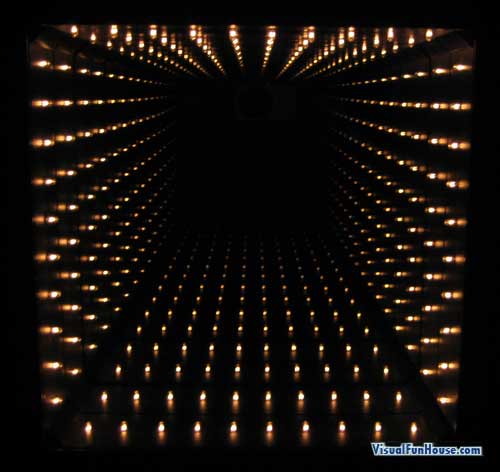
As you can see the l.e.d relfection is completely giving the illusion of space. It creates an arm size hole that looks like it carries on into the table for a long distance. I found through iterations of my design that the distance of the two mirrors greatly influences the pattern created. I chose the closest reflection distance to make the reflections smaller in distance but it also creates a  larger illusion of space.

Iam very happy with my project and believe it incompasses all degrees of sight and cognitive interaction.

Prototype 5

Lastly I decided to keep the same l.e.d's as I started with. These l.e.d's are bright, simple and clean. A simple off/on design it is useful in focusing attention on the design itself and the illusion any light within the certain parameter's of the design would have instead of making the user concentrate on how pretty the lights look, the design is about the interaction of making your own simple pattern and also by trying to understand how the illusion is made.

The design should make the user feel curious about how the illusion is constructed, but the main interaction is the visual effect of the illusion.

Prototype 4

 
This image shows again the size of the design and also importantly the thin circle of paper that will be used to go over top of the final mirror tint. The reason for this is to block out in surrounding light that may refract the l.e.d's light path. It is also more visually appealing as a final design because it adds effect to the over-all aesthetics of the design. The project has a lot of potential to either look well crafted or poorly crafted and I believe something as small as a strip of coloured paper can really improve the look of the design.

Prototype 3

This 17.5cm diameter circle will be a perfect size for the interactive projection as it is still a comfortable hand held size, the 2cm thick cylinder will also aid the design. The mirror tint hase been applied completly flat against a piece of plexiglass that I cut and shaved to size, the plexiglass is a completely flat, completely clear material which is perfect to apply the tint to and will also help reflect the l.e.d's better.

Prototype 2

In this image the illusion is working well. As you can see the l.e.d's are being relfected against each other from the mirror tint on both sides, the project is successful.

From here I want to refine the craftsmanship of the project and also play with size. I want to make a slimmer cylinder and a larger one too. I think the illusion and interactivity will be more effective if the cylinder was bigger as it creates a more interesting concept and illusion.

Prototype 1

This prototype is a simple test to see if the project was possible, not the round shape, even spacing and black inner paint as features to enhance the effect of the visual illusion.

The plan from here is to have a layer of mirror tint on top and on the bottom of the cylinder, this way the l.e.d's are reflecting constantly from side to side, creating the illusion of space between the relatively thin cylinder.

I'm happy with the development of the project and I think if I can get the mirror tint to sit flat against one in other in the reflection then the illusion of space will be greater with every successful reflection.

Monday, 1 August 2011

Interaction Design Research

I wanted to use sight as my sense for the interaction design, because it is something that doesn't need a lot of control or instruction, the interaction is immediate. For this reason I want to explore the idea of optical illusion for my interaction.

I want to use light as a medium for interaction.